

Once you get past three or four loyalty programs, keeping every balance straight in your head stops working. I have a half dozen usernames and another half dozen passwords because each site is finicky. This one wants only four numbers. That one wants eight or more characters including capitals, symbols, letters, and numbers. And then there are the awful accounts that prompt you for a “username” but never tell you the username is actually your email address. Then add my wife Megan’s accounts, and the number doubles. AwardWallet exists to fix exactly this mess: it is a free service that stores your loyalty logins and pulls every balance, elite status, certificate, and expiration date into one dashboard. This is a hands-on review of how it works, what it costs, whether it is safe, and whether the paid Plus tier is worth $49.99 a year.
What Is AwardWallet?
AwardWallet is a balance-and-itinerary aggregator. You give it the login for each of your airline, hotel, car-rental, credit-card, and shopping reward programs, and it signs in on your behalf to report your balances, elite status, available certificates, and expiration dates in one place. Instead of logging into a dozen finicky sites every month to see whether anything is about to expire, you open one dashboard.
The free service tracks an unlimited number of loyalty programs, and according to AwardWallet’s own homepage it now supports over 607 loyalty programs and tracks more than 229 billion points across its user base. That covers the obvious airlines, hotels, and car agencies, but also credit-card programs, dining and shopping rewards, and a long list of smaller schemes you probably forgot you joined. It also handles family and multi-account tracking, so you can watch your own balances and a partner’s on the same screen. Fortunately, AwardWallet lets me view both of our accounts all on the same page, which is the single feature that turned me from a casual user into a daily one.
If you are newer to all of this, it helps to first understand what miles and points actually are and the broader set of loyalty programs we cover before you start plugging logins into a tracker.
How AwardWallet Works
Adding An Account
The sign-up process for each new account is simple. You click the green “plus” symbol next to “Balances,” start typing the name of the program (try either the company name or the program name), enter your username and password, and click a checkbox next to a liability waiver. That waiver matters, because you are authorizing a third party to log in for you, and it is worth reading before you check the box.
You then have a choice. You can save your login details with AwardWallet so they are accessible on any computer, or save them locally so they are accessible only on that one machine. I prefer saving with AwardWallet because that is the whole point of the convenience, but the local option is there for anyone who would rather not hand a cloud service their credentials. AwardWallet can even redirect you to the program’s website and log you in automatically.
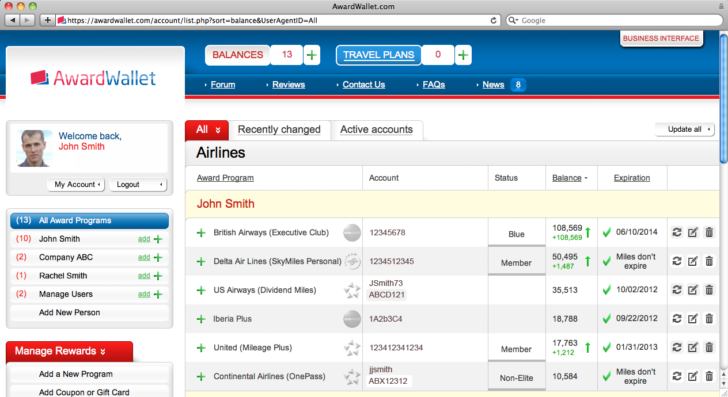
You get a very complete set of information about all your accounts in one place.
What The Dashboard Shows
On the AwardWallet homepage you can see most of the details you need without clicking through: account number, elite status, upgrade certificates available, the number of miles or points, and the expiration date if there is one. For someone juggling a lot of programs, that single view is the product. When an award opportunity comes up, I can evaluate every option at a glance instead of logging into eight sites to find out what I am working with.
There are a few minor bugs from time to time, but these are largely the fault of the loyalty programs rather than AwardWallet. I had trouble with Hyatt once because only one of my two free-night awards displayed, and it was genuinely hard to tell there were two even when I logged into Hyatt’s own site, since the second night was hidden on a separate page. I contacted AwardWallet while writing this review and the problem was resolved within 48 hours. Even when something does not sync, you can work around it by entering your own coupon codes or awards manually, which is what I have done with United vouchers from taking a bump on an oversold flight. Those never show up in my United MileagePlus account, so there is no way for AwardWallet to track them automatically.
Is AwardWallet Free? Free vs AwardWallet Plus
Yes, AwardWallet is free, and the free tier is genuinely useful. It tracks an unlimited number of loyalty programs for you and your family with no cap on the number of accounts. The two real limits are that it only displays expiration dates for three accounts, and it updates your balances sequentially, one at a time, rather than all at once. For a lot of people, that is plenty.
AwardWallet Plus costs $49.99 per year and removes those limits. It displays expiration dates for all of your accounts, updates accounts in parallel for faster refreshes (AwardWallet describes this as up to five times faster), and lets you refresh a single account an unlimited number of times per day instead of twice. Plus also adds historical balance graphs, the ability to export your balances to Excel or PDF, automatic background refreshing, and credit-card spend analytics. If you are someone who babysits free-night certificates, upgrade vouchers, and companion fares across many programs, those are the features you are paying for.
| Feature | AwardWallet Free | AwardWallet Plus |
|---|---|---|
| Price | $0 | $49.99 / year |
| Loyalty programs tracked | Unlimited | Unlimited |
| Accounts (yourself + family) | Unlimited | Unlimited |
| Expiration dates displayed | 3 accounts only | All accounts |
| Balance update speed | Sequential | Parallel (up to 5x faster) |
| Manual refreshes per account / day | Twice | Unlimited |
| Historical balance graphs | No | Yes |
| Export to Excel / PDF | No | Yes |
| Credit-card spend analytics | No | Yes |
| Itinerary / travel-plan tracking | Yes | Yes |
| Expiration alerts (email + push) | Yes | Yes |
| Two-factor authentication | Yes | Yes |
| Tracks American AAdvantage | No (blocked by American) | No (blocked by American) |
| Programs supported | Over 607 | Over 607 |
Is AwardWallet Safe?
This is the question that should give anyone pause, and the honest answer is that AwardWallet involves a real trade-off. To do its job, it stores your loyalty credentials and logs in on your behalf. That is convenient, and it is also the inherent risk of any aggregator: a single third party holds the keys to a stack of your accounts.
AwardWallet’s own protections are in line with what you would expect from a service like this. The company states it uses bank-level encryption, offers multi-factor authentication, and pledges that it will never sell your data. If storing credentials in the cloud still makes you uneasy, you do not have to. When you add an account, you can choose to save your login locally on a single device instead of with AwardWallet’s servers, which keeps your passwords off the cloud at the cost of some convenience. The mental model that works for me is a password manager: encrypted and genuinely useful, but you are deciding to trust one company with a lot of access. If you are comfortable with a password manager, AwardWallet is a similar bet. If you are not, the local-storage option exists precisely for you.
What AwardWallet Tracks (And What It Doesn’t)
AwardWallet links up with far more than airlines, hotels, and car agencies, which honestly surprised me the first time I went digging. There are a lot of programs you can track, from credit-card rewards like Citi ThankYou and Chase Ultimate Rewards to dining and shopping schemes like OpenTable, Starbucks, and even Groupon, where I so often forget about coupons I have already bought. It is worth spending some time searching through all the options rather than relying on autocomplete, because the long tail of supported programs is where the tool earns its keep.
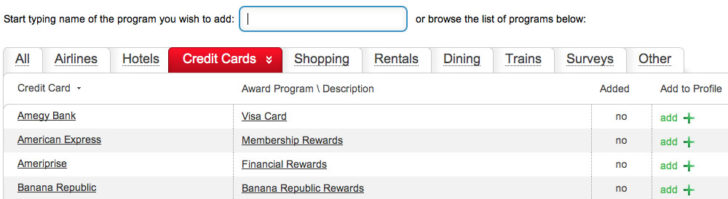
There are far more supported programs than most people realize, well beyond the obvious airlines and hotels.
The one big gap is American Airlines. AAdvantage can no longer be tracked through AwardWallet, and there is no workaround. American forced AwardWallet to stop accessing AAdvantage accounts and demanded the company scrub American customer data from its system. AwardWallet tried building a local-only browser extension to address American’s data concerns, but American objected to that too. This block has been in place since 2021 and remains in effect, so for the foreseeable future you will need to check your American AAdvantage balance directly with American. The smaller, occasional display bugs (like that Hyatt free-night quirk) are usually the loyalty program’s fault and tend to get fixed, but the AAdvantage situation is a hard wall, not a glitch.
AwardWallet Travel Plans & Other Features
Because AwardWallet has access to your accounts and confirmation emails, it can also pull together your upcoming itineraries. For a flight it gives you a route map courtesy of GCMap.com along with the individual flight numbers, departure times, aircraft models, and meal options. With a hotel it just shows a generic picture, but the flight detail is genuinely clean.
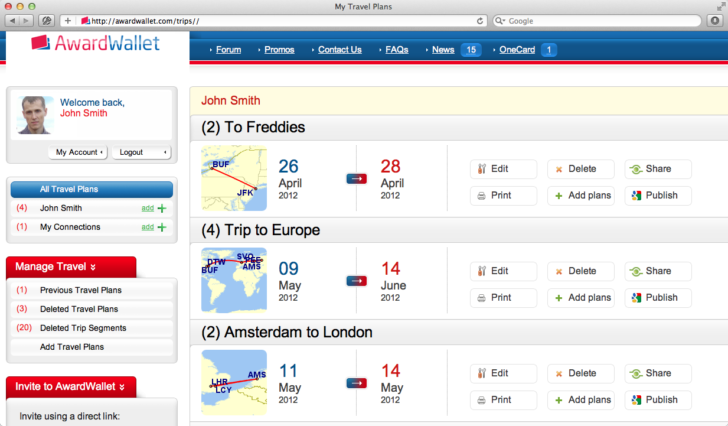
Each trip is listed separately along with a helpful map of the itinerary.
I am not sure how essential this is, since I already get email alerts from the airlines and hotels directly, but breaking trips down by flight number and departure time is a little cleaner than how most carriers present it, and the itinerary detail page is refreshingly free of the ads I get whenever I try to print a boarding pass.
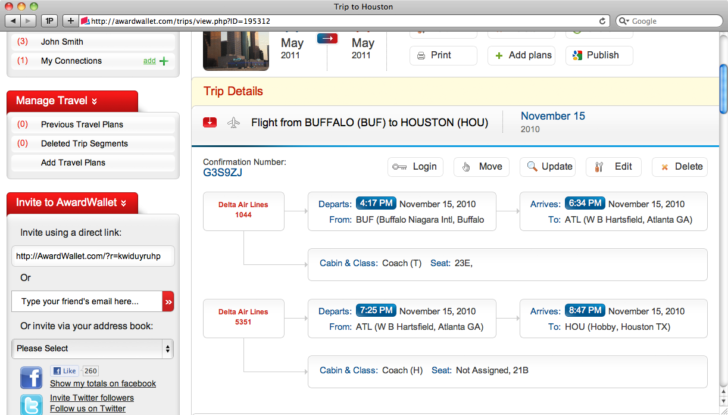
The itinerary details page is not full of ads, unlike most airline boarding-pass pages.
Beyond itineraries, AwardWallet surfaces current promotions for the programs you are enrolled in under its “Promos” view, sends expiration alerts by email and push notification before points die, and on Plus offers credit-card spend analytics. The promotions are mostly the advertised offers you would also get by email, but having them in one place is convenient.
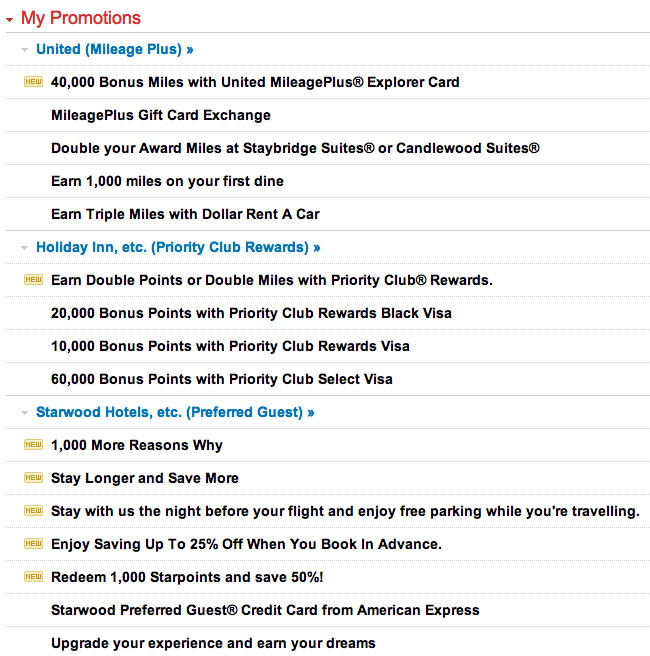
The Promos tab gathers current offers for your enrolled programs in one place.
AwardWallet Pros and Cons
Pros
- Free tier tracks unlimited programs for you and your family with no account cap
- One dashboard for every balance, elite status, certificate, and expiration date
- Expiration alerts that genuinely save points from quietly dying
- Pulls travel itineraries automatically, with the option to store logins locally for the security-conscious
- Multi-factor authentication and bank-level encryption
Cons
- You hand a third party your loyalty logins, the inherent trade-off of any aggregator
- American AAdvantage can no longer be tracked, with no workaround
- Free tier shows expiration dates for only three accounts
- The $49.99/year Plus tier is a hard sell unless you juggle many accounts and certificates
- Occasional display bugs, usually caused by the loyalty programs themselves
Is AwardWallet Worth It? Who It’s For
Free AwardWallet is close to a no-brainer for anyone past three or four loyalty programs. It is the single easiest way to stop losing points to expiration, and there is no cost to find out whether it fits the way you collect. If you have a partner or family whose balances you also keep an eye on, the shared-access feature alone justifies the sign-up.
AwardWallet Plus at $49.99 a year is a narrower recommendation. It earns its keep if you are tracking a large number of accounts, watching multiple certificates like free nights, upgrades, and companion fares, and you want all-account expiration display, faster parallel updates, and historical balance graphs to see where your points are trending. Casual collectors with a handful of programs should stay on free, where they will not miss much. Heavy hobbyists and award-travel obsessives are the real buyer for Plus, and they will know who they are. For a sense of where AwardWallet sits among the broader toolkit, it is one of several other useful tools for award travel worth knowing about.
Frequently Asked Questions
Is AwardWallet free? Yes. The free version tracks an unlimited number of loyalty programs for you and your family with no account cap. The catch is that it only displays expiration dates for three accounts and updates balances one at a time. AwardWallet Plus removes those limits for $49.99 per year.
Is AwardWallet safe to use? AwardWallet uses bank-level encryption, offers multi-factor authentication, and says it will never sell your data. The honest trade-off is that it stores your loyalty logins and signs in on your behalf, so you are trusting a third party with your credentials. If that worries you, you can store logins locally on one device instead of in the cloud.
How does AwardWallet work? You add each loyalty account by entering your username and password, and AwardWallet logs in to pull your balance, elite status, certificates, and expiration dates into one dashboard. It refreshes those balances on a schedule and alerts you by email and push notification before points expire.
Is AwardWallet Plus worth $49.99 a year? It depends on how many accounts you track. If you have a large number of balances and certificates to watch, all-account expiration display, faster parallel updates, and historical graphs are worth it. If you only track a handful of programs, the free version is plenty.
Does AwardWallet track American Airlines AAdvantage miles? No. American Airlines forced AwardWallet to stop tracking AAdvantage accounts and there is currently no workaround, so you will need to check your AAdvantage balance directly with American.
How many loyalty programs does AwardWallet support? AwardWallet supports over 607 loyalty programs across airlines, hotels, car rental, credit cards, and shopping, according to the figure published on its homepage.
The Bottom Line
If you collect miles and points across more than three or four programs, install the free version of AwardWallet today. It is the cleanest way to see every balance, elite status, certificate, and expiration date in one place, and the expiration alerts alone will eventually save you points you would otherwise have let die. If you are a heavy collector juggling many accounts and certificates, and you want all-account expiration display, parallel updates, and historical graphs, the $49.99-a-year Plus tier is a reasonable upgrade. The one honest caveat applies to everyone: you are trusting a third party with your loyalty logins, and American AAdvantage cannot be tracked at all because American blocks it. If you are comfortable with that trade-off the way you would be with a password manager, AwardWallet is one of the most useful free tools in this hobby. For newcomers still setting up their first cards, our beginner’s guide to points and miles credit cards is the right next step.
