Ask a roomful of points-and-miles veterans which flight-search tool they reach for first and a surprising number say the same thing: ITA Matrix. It looks dated, it cannot sell you a ticket, and most casual travelers have never heard of it. Yet for anyone who wants to understand what an airfare is made of, where the cheap routings hide, and which days are worth shifting a trip around, nothing else comes close. This guide takes you from a basic search to the advanced controls that make Matrix worth learning.
What ITA Matrix Is and Why Power Users Love It
ITA Matrix is an advanced flight-search engine built by ITA Software, the company Google acquired and folded into its travel operation. The same fare-shopping engine sits behind a long list of airlines and online travel agencies, which is why the tool exposes a level of detail you never get from a consumer booking site. You are looking at the airline industry’s own pricing logic rather than a marketing-friendly summary of it.
What hooks people is control. Matrix lets you dictate routings down to the connecting city, demand a specific fare class, search a flexible calendar of the lowest fares, and read the full fare construction of every result. Google built Google Flights on much of the same technology, but Flights is the polished consumer product while Matrix is the lab bench. As the longtime author of this series put it after a Google update, “I won’t be going anywhere else for the time being.”
It Is Free, Google-Owned, and Cannot Book Your Flight
Three things to get straight first. ITA Matrix is free to use, with no membership, paywall, or checkout. It is a Google product, reassuring on reliability even if the interface never won any beauty contests. And, most important, Matrix cannot book anything; it is a search and pricing tool.
That last point trips up newcomers. You find a fantastic fare, then have to go elsewhere to buy it. The workflow is to use Matrix to identify the exact itinerary you want, including flight numbers, dates, and fare, then replicate it on an airline’s website or a trusted online travel agency. Matrix tells you what is possible and at what price; the airline or OTA is the cash register.
How to Run a Basic ITA Matrix Flight Search
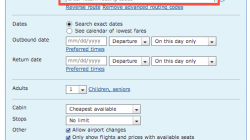
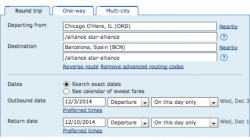
The front page keeps things simple. Choose round trip, one way, or multi-city, then enter your origin and destination, your dates, and the number of passengers. Hit search and Matrix returns a list of priced itineraries you can sort and filter, which for most people is enough to confirm a fare is reasonable before booking elsewhere. Just above the departure field, Matrix keeps links to recent searches, handy when you want to repeat one and watch the price move. You can also enter more than one airport in a single field by separating codes with commas, for example “LHR, FRA, CDG” when any of those three European gateways would work; plenty of seasoned users prefer typing airports by hand rather than relying on automated pickers.
One-Way and Multi-City Searches
One-way and multi-city searches behave much like a round trip, and the routing language works here too, though in a one-way search you can only apply it to the departure field since there is no return leg. Multi-city acts like several one-way searches stitched together, with up to six segments you can add or delete; that limit applies to the segments you define, not the actual flights, so a single Seattle-to-Rome leg might still return several connections. Reach for multi-city when you want an extended stay in more than one place, since separate one-way tickets can cost more than a single itinerary.
Advanced Airfare Search Controls That Set Matrix Apart
The basic search is the door; the advanced controls are the reason you walked in, turning a fancy fare lookup into a routing instrument.
Routing Codes and the Advanced Routing Language
Matrix accepts a compact routing language that tells the engine exactly how you want to fly. You can force a connection through a particular city, exclude an airport you would rather avoid, demand or forbid specific carriers, and string several instructions together to see only itineraries through a chosen hub, only nonstops, or only flights that skip a tight connection. We cover the syntax in depth in our companion piece on the ITA advanced routing language, with more tips in a follow-up.
Extension and Booking Codes
You can also specify the exact booking class, or fare class, you want priced. Every cabin is divided into multiple booking codes that matter enormously for upgrades, mileage earning, and award eligibility, so telling Matrix to return only a particular code confirms whether the inventory you need is available and what it costs. You can also set minimum connection times and target specific flight numbers when you already know the flight you want.
Specific Airlines and Alliances
You are not limited to one airline. Matrix lets you name several carriers, restrict results to a single alliance, or exclude carriers you would rather not fly, which is invaluable when crediting miles to a particular program or staying within an alliance for status. One quirk: results can look lopsided on the first pass, showing fares from only one named carrier on the outbound, but after you select an outbound the return options usually fill in with the mixed-carrier itineraries you expected. Do not give up after the first screen.
Calendar and Lowest-Fare Searches
If your schedule has any give, the calendar search is a standout. Beyond flexing your dates by one to three days, you can select “see calendar of lowest fares,” enter the earliest date you would consider departing, and specify how many nights you want to stay as a single number or a range. Matrix returns a calendar showing the lowest price for each departure day across about a month, and with a range of trip lengths, hovering over a date shows how the price changes with the length of your stay. This is where flexibility turns into real money: the original guide showed a case where shifting a trip by a few days saved nearly $1,200. Weekend trips in particular swing wildly with the exact dates, and the calendar lays it all out at a glance.
Time-Bar and Nearby-Airport Searches
Once you have results, the time-bar view lets you filter by departure and arrival windows to rule out red-eyes or punishing early starts. Matrix also offers a “nearby” link beside the origin and destination fields that suggests additional airports within a radius, adding several with one click instead of typing each code.
A word of caution from hard experience: the nearby-airport tool is less helpful than it looks. It is useful when you do not know a region, but it invites abuse. Some airports it suggests do not even have regular commercial service, and a dozen airports in one query produces messy results that take longer to return. Choose them selectively, and in doubt, enter the airports you want by hand.
Cabin, Stops, and the Bonus Settings
Dropdown menus set the cabin you want to price, from economy up to first, and limit the number of stops. Pair the cabin filter with a specific booking code and you can answer precise questions, such as whether discounted business-class inventory exists on your dates. A cluster of radio buttons near the bottom of the page rounds out the controls, and these are the bonus settings that quietly maximize the tool’s value.
- Allow airport changes. This matters when you enter multiple airports, or a metro code like NYC instead of JFK and LGA. Checked, Matrix can fly you into one airport and out of another, fine in a city like New York or on a European tour. Uncheck it when you must use the same airport both ways, such as relying on an airport hotel shuttle, or when pricing several separate vacation options at once and you do not want to be sent home from a city you never intended to visit.
- Available seats. The box labeled “only show flights and prices with available seats” hides itineraries with no current availability. Leave it checked to book today; uncheck it when you only want to know what flights exist.
- Currency and sales city. The currency setting displays prices in another currency, and the sales city defaults to your first departure city, since airlines sometimes quote different prices depending on where a ticket is sold. Booking a separate Bangkok-to-Siem Reap ticket on a trip to Cambodia, the author used these settings to compare prices in US dollars even though the purchase was ultimately paid in Thai baht.
Reading the Results and the Fare Construction
The results list is sortable, and the sort options are part of the power. Click the price control and you can reorder results or switch to “price per mile,” which keeps the total fare visible but sorts by cost divided by total distance flown. That sort is built for mileage runs, where you might happily pay a little more to fly an extra thousand miles, though mixed-carrier itineraries can earn under different rules so treat it as a guide. Mileage running is also less common now that many programs award miles by ticket price rather than distance.
The real prize is the fare construction. Click into an itinerary and Matrix shows how the fare is assembled segment by segment, including the fare basis codes and the taxes and carrier-imposed surcharges that build to the total. Learning to read this breakdown separates someone who finds a cheap fare by luck from someone who understands why it is cheap.
Common Use Cases
Three jobs come up again and again. The first is finding cheap fares: flexible-date calendar search plus granular routing control surfaces deals a standard booking site buries. The second is studying fare construction to spot unusual routings, including the fuel-surcharge-free or “fuel-dump-free” routings enthusiasts trade tips about, since the segment-by-segment breakdown shows exactly where surcharges attach; our piece on booking fuel dumps goes deeper there. The third is sanity-checking award availability: Matrix prices cash fares, not award space, but requesting a specific booking class confirms whether the inventory an award would draw from exists on your dates, a handy cross-check before you hunt in a program’s award engine.
Limitations to Keep in Mind
Matrix is powerful, not perfect. It cannot book, and it prices cash fares rather than award tickets, so it complements award tools rather than replacing them. The interface has never been fast or pretty, and after Google’s rebuild some users found searches slower, with an occasional nag suggesting you try Google Flights instead. None of this is a dealbreaker, but it is worth knowing going in.
Tips for Getting the Most Out of Matrix
A handful of habits make the tool far more pleasant. Enter airports by hand rather than leaning on the nearby picker, and resist stuffing a query with too many airports or overly permissive routing codes, since broad searches return slowly and bury the good results. Reach for the calendar search early when your dates are flexible, because it often reframes the whole trip. And once you find the itinerary you want, note the flight numbers, dates, and fare so you can replicate it precisely on the booking site.
Frequently Asked Questions
Is ITA Matrix Free to Use?
Yes. ITA Matrix is free, with no account required to run a search and nothing to subscribe to.
Can You Book Flights on ITA Matrix?
No. Matrix cannot sell you a ticket. You use it to identify the exact itinerary and fare, then replicate that itinerary on an airline’s website or a trusted online travel agency to actually book it.
Who Owns ITA Matrix?
Google. ITA Software, which built the underlying fare engine, became part of Google, and the same technology powers Google Flights as well as the search behind many airlines and online travel agencies.
How Do You Search Multiple Airports at Once?
Type the codes into the origin or destination field separated by commas, for example “LHR, FRA, CDG.” The nearby-airport link can add suggested airports within a radius, though entering the airports you want by hand usually produces cleaner results.
What Does Price Per Mile Mean in the Results?
It sorts itineraries by ticket price divided by total distance flown, which is useful for mileage runs. The total price still shows; only the sort order changes. Treat it as a guide, since mixed-carrier itineraries can earn miles under different rules.
The Bottom Line on ITA Matrix
ITA Matrix rewards a little patience with a lot of insight. It will never be the prettiest tab in your browser, and it will never book your ticket, but it hands you the airline industry’s own pricing logic and lets you bend it to your needs, whether you are flexing dates across a calendar, demanding a specific booking class, hunting clean routings, or simply making sure a fare is fair before you buy it elsewhere. Learn the routing language, get comfortable reading a fare construction, and treat the booking site as the place you go to pay. Do that and Matrix earns its spot as the first tool serious travelers reach for.